TikTok marketing for apps, without ads or filming.

Most TikTok marketing for apps advice is about paid installs. The cheaper route is organic photo slideshows: one creator, a story people save, and your app on the slide where it belongs. ClonBot makes them from slideshows that already went viral and posts them for you.

Free, no sign-up. Type your app and get three slideshow ideas for it in about 20 seconds.

1,303 viral formats with a spot for an app3.6M median views per format2 posts a day from $99/mo

Why photo slideshows work for app marketing.

Ads buy installs one tap at a time, and creator videos need someone to film. A slideshow is a few photos with a line of text each, and on TikTok it reads like a post from a friend.

  • Nothing to film

    Photos and short text, swiped at the viewer's own pace. No shoot, no editing timeline, no voiceover.

  • Made to be saved

    Lists, guides and day-of posts get saved and sent. Across our library the median slideshow was saved by 3.5% of the people who saw it.

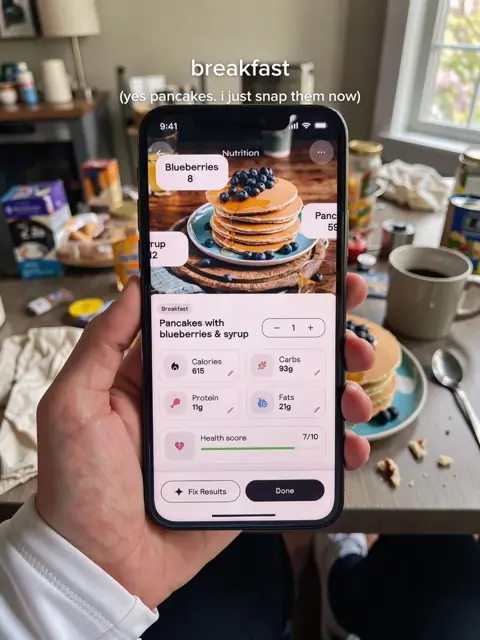
Slide 2 of a what-I-eat-in-a-day post: a hand holds a phone logging pancakes with berries, the plate on the table behind it
Slide 2 of 6 from a remake ClonBot made for a calorie app. We're not affiliated with Cal AI.
  • No one on camera

    The account has its own creator, so nobody on your team has to show their face. More on that in faceless TikTok.

  • The app, doing its job

    Breakfast gets logged before she eats it. The app is part of her day, not a banner, and the comments ask what it is.

Where your app fits in a slideshow.

Pick your kind of app. You'll see how many viral formats in the library have room for it, the format types that fit best, and a remake where the app shows up.

Day of eating, remade for Cal AI. Tap to swipe.

Calorie and meal apps. The plate is the hook.

In a day-of-eating post, one meal gets logged on the phone before she eats it, then the post goes back to food. Recipe and meal-prep lists work the same way: one card is the app's grocery list.

Formats that fit
286
Median views
4.0M
Median saved
3.9%

Fits best in guides (67), recipes (42) and tips lists (38). 66% of these formats come from outside food and nutrition.

Another library format that fits

Tough-love post, remade for Duolingo. Tap to swipe.

Language apps. The trip is the payoff.

Five bleak rooms ask "oh, you don't want to practise?", then the last slide is a streak on her phone at a café abroad. Study guides and "things I want to see" lists carry a lesson screen just as easily.

Formats that fit
184
Median views
3.2M
Median saved
3.5%

Fits best in guides (48), tips lists (45) and photo dumps (19), drawn from 17 different niches, travel and study most of all.

Another library format that fits

A "don't gatekeep" Q&A, remade for Rocket Money. Tap to swipe.

Money apps. One question, one screen.

A "don't gatekeep" Q&A asks how she stops losing money on subscriptions, and the answer slide is the app's list of upcoming charges. In guides it's one tip: "I split these automatically."

Formats that fit
333
Median views
3.0M
Median saved
3.5%

Fits best in guides (87), tips lists (67) and photo dumps (44). 86% of them aren't money posts at all: travel, study and couples formats carry a budget app well.

Another library format that fits

Glow-up list, remade for Finch. Tap to swipe.

Habit and self-care apps. One tip of five.

Glow-up tips, part 2: tip four is the little self-care pet that reminds her to drink water, on her phone at the sink. The other tips are masks, sleep and eye patches, so it reads like advice.

Formats that fit
687
Median views
3.5M
Median saved
3.5%

The widest fit in the library: guides (142), tips lists (134) and photo dumps (75). 81% come from outside mental health and mindset.

Another library format that fits

The "I see it, I got it" story, remade for Hinge. Tap to swipe.

Dating apps. The match is slide two.

"I see it": she spots him at the gym. "I liked": his profile on her phone. Then the date, then the two of them on a cliff. Four slides, and the app is the turning point of the story.

Formats that fit
145
Median views
6.1M
Median saved
2.6%

Fits best in tips lists (22), photo dumps (17) and guides (17). These get the most views of any group here and fewer saves: people watch love stories and share them.

Another library format that fits

Sleepover list, remade for Dronk, our own party game app.

Party and social games. The game is on the TV.

Halloween sleepover ideas: matching pyjamas, ghost cookies, a blanket fort, then music jeopardy on the TV with the game on screen. The night is the post; the game is one of the plans.

Formats that fit
42
Median views
3.4M
Median saved
2.8%

A smaller, tighter set: photo dumps (14), tips lists (14) and guides (5), mostly sleepovers, birthdays and game nights. More in TikTok marketing for mobile games.

Another library format that fits

Study methods list, remade for Opal. Tap to swipe.

Study and focus apps. The last method on the list.

Active recall, the Feynman technique, Pomodoro, then "blocking your apps", with the block screen on his phone. The app earns its place as a method among real methods.

Formats that fit
247
Median views
3.2M
Median saved
3.7%

Fits best in guides (64), tips lists (61) and relatable posts (26). 67% come from outside study and career.

Another library format that fits

Beginner routine, remade for Strava. Tap to swipe.

Fitness and running apps. Wednesday's workout.

A beginner run-walk week, one day per slide. On Wednesday the run is logged on his phone, then Friday and a last line of encouragement. The plan is the content; the app keeps score.

Formats that fit
358
Median views
3.0M
Median saved
3.2%

Fits best in guides (91), tips lists (59) and photo dumps (39). 65% come from outside fitness and sports.

Another library format that fits

Examples made by ClonBot to show what it does. We're not affiliated with these apps, except Dronk. Counts are formats in the ClonBot library whose app notes name that kind of app.

The app is a moment, not the cover.

59 slideshows in our library went viral with an app screen already in them. Almost none of them opened with it.

  1. 3
  2. 17
  3. 7
  4. 8
  5. 9
  6. 3
  7. 2
  8. 5
  9. 0
  10. 5

The slide where the app first appears, across the 59 viral slideshows in the ClonBot library whose original showed an app screen. Slide 1 is the cover.

56 of 59

kept the app off the cover. The hook sells the story; the app comes once the viewer is already swiping.

45 of 59

showed the app on a single slide. One clear moment is enough for the comments to ask what it is.

4.3M views

median for these 59, against 3.6M for the whole library. Showing the app didn't cost them reach.

The TikTok marketing playbook for apps.

Five rules for running an app account on slideshows. None of them need an ad budget; they need consistency.

  1. One creator, every post

    People follow a person, not a logo. Keep the same face on the account so viewers recognise it from the cover, and let friends and family show up around her.

    ClonBotOne creator picked from a library of faces, with 100+ people to cast as friends or family per post.
  2. Start from what already won

    Copy the structure of a post that worked, not its content: the hook, the number of slides, the text style. See slideshow ideas and hooks that work.

    ClonBotStarts every post from one of 1,332 viral slideshows, with their real views and saves.
  3. The app is one moment

    Tell a story your viewer wants, and give the app one slide where it does its job. Show the real screen, not a mock-up with drawn-on buttons.

    ClonBotWrites the story around your app. The phone shows your real screens, from your App Store link or screenshots.
  4. Post every day

    Most posts get ordinary views and a few take off, and you can't tell which in advance. One to three posts a day gives you enough of them to find out.

    ClonBotStarter is 60 posts a month (2 a day). Pro is 150 (3 a day). See pricing.
  5. More than one account

    Different creators and angles reach different people. Run a few accounts, keep posting on the ones that take off, and drop the rest.

    ClonBotPro covers several accounts; Agency covers several apps and accounts.

How ClonBot runs it while you build the app.

Setup is free: add your App Store link or screenshots and pick a creator. If you build in Swift, a coding agent can screenshot your app in the simulator instead.

Every night

Posts are built ahead

Autopilot picks formats and builds the posts for the day after tomorrow, so there's always a day in hand.

Next day

You approve or fix

Approval is on by default. Don't like a slide? Type what should change and only that slide is redone.

At your times

It goes out

Approved posts go to your TikTok at your times with a trending sound, or to your drafts or phone if you'd rather press post.

Afterwards

You see what worked

Results compares each post with your account's usual views, so you know which formats to make more of.

Prefer to work from Claude? ClonBot has an MCP server, so Claude can plan and run your content week. For the whole channel, from account setup to reading results, see how to market an app on TikTok.

Questions app makers ask.

Does TikTok marketing work for apps?

It can, especially for consumer apps that fit into an everyday moment: eating, saving, studying, training, dating, a night in. Results depend on the app and on posting steadily: most posts get ordinary views and a few take off. Apps without a visual moment, like many B2B tools, have a harder time; see TikTok slideshows for SaaS.

Should I run TikTok ads or post organically?

They do different jobs. Ads buy reach you can switch on today and you pay for every result. Organic slideshows cost little per post and build an account that keeps getting views. A slideshow that does well organically is also a tested hook you can put ad money behind later. Many small teams start organic and add ads once they know what works.

Do TikTok slideshows work as well as videos for apps?

For organic posts, slideshows are often the easier win: no filming, quick to make, and lists and guides get saved. The median slideshow in our library of 1,332 viral posts had 3.6M views. Video still matters for demos and ads; slideshows are the cheap, steady part of the mix.

How often should an app post on TikTok?

One to three posts a day per account is a pace you can learn from. Posting once a week tells you very little, because a single post's views are mostly luck. Running several accounts with different creators widens the net further.

Do I need to show my face?

No. Each account gets one consistent creator from ClonBot's library of faces, and friends or family are cast per post. You never appear unless you want to.

What is the 3-second rule on TikTok?

It's the common advice that a post has to earn attention in its first few seconds. In a slideshow that job falls to the cover and its hook. The median hook in our library is 8 words, short enough to read before the thumb moves on.

How much does it cost?

Setup and the try field are free. Starter is $99 a month for 60 posts, about $1.65 a post. Pro is $249 for 150 posts and Agency $499 for 400. Yearly plans are 25% off. Details on pricing.
Put your app in a story people save.

Setting up your app and creator is free. Plans from $99 a month for 60 posts.